REVIEW · LONDON
London National Gallery Self-Guided Tour with App (No Tickets)
Book on Viator →Operated by Tourific · Bookable on Viator
Great art, no guide needed. I love the offline audio app that works even without Wi‑Fi, and I love the 1-hour highlight route aimed at the National Gallery’s best-known works. One catch: the audio commentary covers only 12 artworks, so you’ll likely want extra time (or extra reading on-site) if you want more depth.
This is a simple way to get structure inside a huge museum. Entry to the National Gallery is free, but your app does not include museum tickets, so you’re responsible for walking in (and you may choose to reserve ahead to cut waiting). You start at Trafalgar Square and use the app on your phone for up to a year, including at home later.
In This Review
- Key things to know before you go
- Offline-first audio inside the National Gallery
- Starting at Trafalgar Square: how to plan your 1–2 hour visit
- Your 12-artwork highlight circuit: how the visit flows
- What the audio helps you see: symbolism and style cues
- Price and value: what $5.98 really buys you
- Language and tech realities: English audio, codes, and battery life
- Who should book this National Gallery app tour?
- Should you book this tour?
- FAQ
- FAQ
- Do I need internet during the tour?
- How long does the app tour take?
- How many artworks are included in the audio?
- Does this include museum entry tickets?
- What do I need to bring?
- Can I use the tour more than once?
- Where does the tour start?
- Is this tour part of a large group?
- What is the cancellation policy?
Key things to know before you go
- Offline audio included: download once, then use it without internet inside the museum
- A short, focused plan: designed to hit 12 paintings in about an hour
- Built-in navigation help: an in-app map guides you from artwork to artwork
- Replay anytime for a year: listen again at the museum or from home
- No human guide: you’re on your own with the audio (and no headphones are provided)
Offline-first audio inside the National Gallery

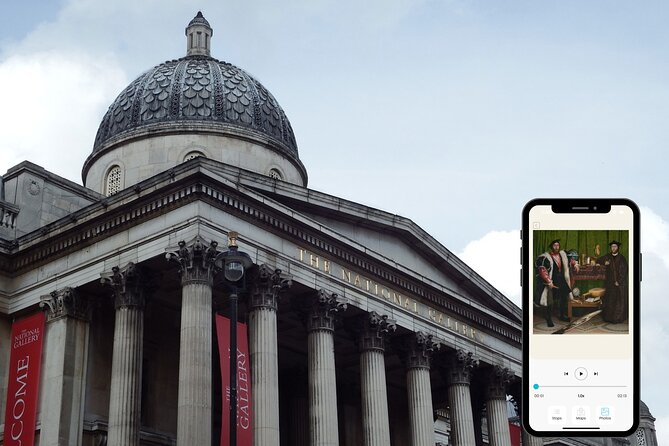
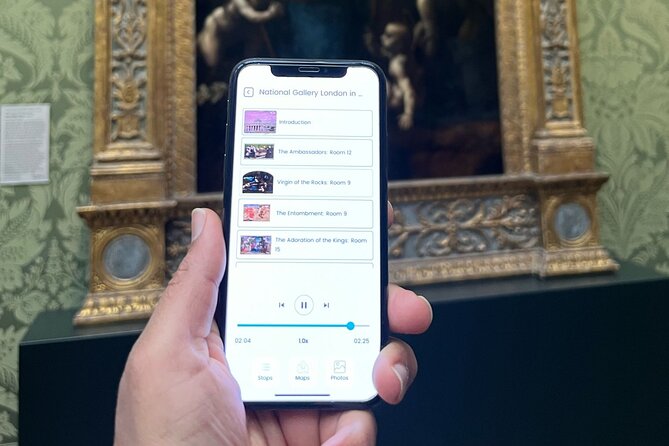
This tour is built around your smartphone, using the Tourific app with an audio commentary for 12 selected artworks. The big win is offline use: once you download the tour, you can keep listening inside the museum even if your phone has no data signal.
That matters in London museums, where Wi‑Fi can be spotty and phone batteries can drain fast. Offline audio helps you stay present, not hunting for service bars. It also means you can download when it’s convenient—then focus on walking, looking, and listening when you’re there.
The audio itself is described as AI-narrated. That’s not automatically bad. In practice, it usually means clear, repeatable explanations you can absorb at your own pace—pause when you want, rewind when you miss something, and move on when your feet start complaining.
One practical thing: the experience doesn’t include headphones or any physical listening device. If you want audio without disturbing nearby visitors, plan to use your own wired or wireless headphones.
A few more London tours and experiences worth a look


Starting at Trafalgar Square: how to plan your 1–2 hour visit
The meeting point is the National Gallery at Trafalgar Square (WC2N 5DN). This location is a convenient base because you’re already in the heart of central London, with plenty of public transport options nearby.
The tour is listed at about 1 to 2 hours, but it’s specifically designed to be completed in roughly an hour if you’re short on time. Think of it as an efficient highlight walk, not a whole-collection tour. You can absolutely spend longer after the audio stops—just know the app’s main guidance is concentrated on those 12 paintings.
The National Gallery opening hours run from 10:00 AM to 6:00 PM daily during the listed range. So if you like quieter galleries and less rush, aim for earlier in the day. If you’re working around other sights at Trafalgar Square, the location makes it easy to plug in.
Because the experience is capped at a maximum of 20 travelers, it’s not set up like a large group bus tour. Still, you should expect the museum itself to be busy at peak times. Your advantage here is you’re not waiting on anyone else—you can start, follow the map, and pause whenever you want.
Your 12-artwork highlight circuit: how the visit flows
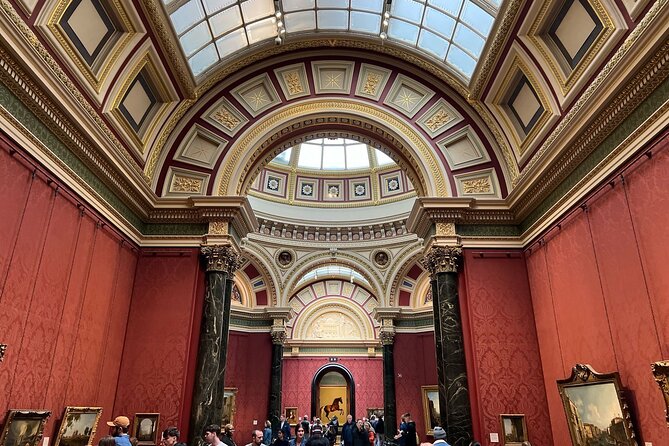
This is essentially one core stop: the National Gallery. The app creates a guided path through 12 renowned paintings, with audio commentary for each artwork. At every stop, the audio is designed to help you go past the usual quick plaque read.
Instead of only telling you what a painting is, it aims to explain:
- what to notice in the artist’s style
- key features you might otherwise miss
- the symbolism inside the scene
- how the work fits into broader art choices
That’s where the app earns its keep. The National Gallery is full of masterpieces, but when you’re in a hurry, it’s easy to skim. A structured route helps you slow down at the right moments.
There’s also an in-app map to help you move from one artwork to the next. If you’ve ever wandered a big museum and wondered whether you’re going in circles, you’ll appreciate having directions built into the experience rather than relying on signage alone.
What the audio helps you see: symbolism and style cues

One of the best ways to enjoy old master paintings is learning how to look. This tour’s audio coaching is aimed at that. It pushes you to notice composition details and symbolic elements—things like how figures are arranged, what objects might represent, and why an artist chose a certain visual approach.
It also ties the works to recognizable master names. The tour description specifically points to artists such as Da Vinci, Rubens, and Van Gogh. Even if you don’t know their work cold, having an audio guide that frames what you’re seeing makes the museum feel less like a checklist and more like a set of connected ideas.
Here’s how I’d use the audio in a practical way:
- Stand in front of a painting and let the first minute of audio play before you start trying to interpret it yourself.
- Then look for one or two details mentioned in the commentary—often that’s where the painting stops being “pretty” and starts being meaningful.
- If a stop doesn’t click, you can move on. The app is meant for pace control, not forcing you to watch every painting the same way.
Is it going to match the depth of a top-notch human art historian? It’s not trying to. And that’s where one drawback becomes important: because it’s only 12 artworks, the explanations are naturally limited to a small slice of the museum. If you want long, multi-hour art education, you’ll need more time in the galleries than this tour’s core plan offers.
Price and value: what $5.98 really buys you
At $5.98 per person, you’re not paying for museum entry—entry is free. You’re paying for a guided structure and a year of access to audio that you can use offline.
So the value depends on how you like to visit museums:
- If you want a clear “hit these paintings first” path, the app is good value.
- If you prefer to explore everything and read plaques for hours, you may feel the audio is too short or too basic.
What’s included is straightforward: access to the Tourific smartphone app for one year, offline access once downloaded, an in-app map, and audio commentary for those 12 artworks. You can listen again at the museum or at home any time during that year.
What’s not included is also important. There’s no human guide, no headphones, and no transport. And while admission is free, you still need to handle entry yourself. If you’re the type who loves to avoid any line at all costs, you may want to reserve entry through the official museum website for shorter queues—especially during popular hours.
You can also read our reviews of more guided tours in London






Language and tech realities: English audio, codes, and battery life
This experience is app-based, so language and technology choices matter more than you might expect.
One review issue highlights a language mismatch: the audio guide was expected in French via the app, but it ended up being English. If you need a specific language for the best experience, double-check the audio language options in the app before you rely on it.
Tech glitches can also affect your day. One negative review points to an access-code delay, which turned into a time sink before the app could be used. You can’t control every system hiccup, but you can control preparation. I strongly recommend:
- download the tour before you’re rushed
- make sure your phone battery is topped up
- bring your charger or a power bank if you’re doing multiple sights
Also, since this is a mobile ticket style experience, give yourself some buffer time after booking. The tour is commonly booked in advance (about 9 days on average), which is usually a clue that having time to sort out access isn’t wasted effort.
Who should book this National Gallery app tour?

This is a smart fit if:
- you have only about an hour and want to see the most famous works first
- you like learning through short prompts at each artwork rather than reading everything on your own
- you don’t want to coordinate with a human group schedule
- you want a plan you can replay later from home
It may be less ideal if:
- you expect the audio to cover most of the museum (it doesn’t; it’s 12 artworks)
- you want very detailed, advanced art-historical commentary for a wide range of works
- you need a specific language and don’t want to risk finding it unavailable
- you’re sensitive to tech friction and would rather have a live guide correct course in real time
And if you’re traveling as a family, the short format can be a plus. You get a clear path with learning moments timed to keep energy from dropping. Just remember: it’s still self-guided, so you’ll want to keep an eye on pacing.
Should you book this tour?
If you want an efficient, low-stress way to understand the National Gallery’s best-known paintings, this app tour is easy to recommend for first-time visitors and time-crunched travelers. The offline audio and built-in map are practical advantages, and the fact that you get a year of replay makes it feel less like a one-time expense.
I’d hold off or pair it with extra on-site time if you’re the kind of visitor who likes deep coverage across many rooms. This tour is designed to be short and focused. Think of it as a guided sampler that helps you look smarter right away—then decide on the rest of the museum with your own curiosity.
FAQ
FAQ
Do I need internet during the tour?
No. After you download the tour in advance, it works without internet access.
How long does the app tour take?
It’s designed to be completed in about an hour, with the overall experience listed at roughly 1 to 2 hours.
How many artworks are included in the audio?
The audio commentary covers 12 artworks selected for the highlight route.
Does this include museum entry tickets?
No. The tour does not include entry tickets. Admission to the National Gallery is free, but you may want to reserve via the official website if you’re trying to reduce queue time.
What do I need to bring?
You’ll need a smartphone to use the Tourific app. The experience does not include headphones or any physical device.
Can I use the tour more than once?
Yes. You can access the app and audio for one year, and you can listen again at the location or at home.
Where does the tour start?
It starts at the National Gallery, Trafalgar Square, London WC2N 5DN, UK.
Is this tour part of a large group?
The experience has a maximum of 20 travelers, and it’s self-guided with no human tour guide at the location.
What is the cancellation policy?
You can cancel for a full refund up to 24 hours before the experience’s start time. If you cancel less than 24 hours before, the amount paid is not refunded.